
Traffic fines in the UAE are mostly issued automatically by radars and cameras, and most are correct. When one is not, because another driver forced you into a lane, you moved for an ambulance, or the fine went to the wrong car, dashcam footage is often the only evidence you have. This guide explains how to object to a fine in each emirate and how to present your footage so it counts.
Yes, you can use dashcam footage to challenge a traffic fine in the UAE. In Dubai, object through the Dubai Public Prosecution website, describing your case in Arabic. In Abu Dhabi, use the grievance service on TAMM. In Sharjah, Ras Al Khaimah, Fujairah and Umm Al Quwain, use the MOI UAE app; Ajman has its own objection service. Object quickly, before paying, and attach the original, unedited clip.
When dashcam footage can help
Police have confirmed that dashcam footage can support a fine dispute, but not every clip is accepted. The authorities check that it is clear and shows the incident accurately. Footage helps most when it shows something the fixed camera could not:
- Another vehicle cutting in, forcing you over a line or into a lane
- Making way for an ambulance, police car or fire engine
- A traffic light, sign or lane marking that was missing, covered or confusing
- Your car somewhere else at the time, when a fine was issued to the wrong plate
- Road works or police directing traffic differently from the signs
How to object to a fine in Dubai
You can also raise a complaint in person at the General Directorate of Traffic in Al Barsha or any police station. Fines issued by the RTA, such as parking fines, are disputed with the RTA rather than Dubai Police.
- Do not pay the fine first. The objection checks that it has not been paid or contested elsewhere.
- Go to the Dubai Public Prosecution website and choose the request to object to a traffic fine.
- Enter your personal, vehicle and address details, and the fine number and date, using a mobile number registered to your Emirates ID.
- Describe what happened in Arabic. Objections written in English are rejected, so use a translator or a lawyer if needed.
- Attach the violation notice, your driving licence, vehicle licence and your dashcam clip.
- Wait for the decision, usually within about 10 working days. If the objection is accepted, you will be called to the Traffic Court to present your case.
How to object to a fine in Abu Dhabi
- Open TAMM and choose the grievance service for traffic violations.
- Enter your Emirates ID, the fine number and type, your plate and contact details.
- Explain the reason for your objection and attach your dashcam clip and any photos.
- Submit and wait for the traffic department to review it; they may contact you for more information.
Sharjah and the Northern Emirates
In every emirate, include the fine details, a clear explanation and your evidence. If you still believe you are not at fault after a rejection, the Public Prosecution can refer the case to the Traffic Court, where you present your evidence in person.
| Emirate | Where to object |
|---|---|
| Sharjah | MOI UAE app (Help, then Complain, with UAE Pass) or the Sharjah Police traffic department on WhatsApp, 06 517 7555 |
| Ajman | Ajman Police website or app (traffic services, objection on traffic penalty), with UAE Pass |
| Ras Al Khaimah | MOI UAE app: Help, then Complain |
| Fujairah | MOI UAE app: Help, then Complain |
| Umm Al Quwain | MOI UAE app: Help, then Complain |
Preparing your footage so it counts
- Save the clip straight away. Fines can arrive days later, by which time loop recording may have overwritten the moment. If something happens, protect the file.
- Use the original file, copied off the card, not a phone recording of a screen.
- Keep the GPS and time stamp on. They tie the clip to the time and place on the fine. See GPS on dashcams.
- Trim nothing in the copy you submit. If the clip is long, note the exact time where the incident starts.
- Include the rear camera if it shows the other vehicle or the emergency vehicle behind you.
Never post the clip online to build public support: publishing other drivers or plates can breach the cybercrimes law. See are dashcams legal in Dubai and the UAE.
Dashcams with GPS and rear cameras
Our highest-scoring front-and-rear dashcams, updated automatically from our reviews

BlackVue Elite 10 2 Channel 4K Dashcam
AED2,418.52- True 4K front and rear — both cameras record 4K at 30fps on Sony STARVIS 2 sensors, with HDR on the front camera.
- Power-saving parking mode under 1 mA — wakes in 0.89 seconds when something happens; needs the hardwiring cable, which is included.
- Supercapacitor, rated −20°C to 65°C — with high-temperature shut-off to protect the camera and its files.
- Boots in under 1 second — starts recording almost as soon as the ignition is on, even from a cold start.
- Built-in GPS, Wi-Fi and BlackVue app — with 5 GB of free cloud storage and support for cards up to 1 TB.

THINKWARE U3000 Pro 2 Channel 4K Dashcam
AED2,223.09- 4K front + 2K rear on dual STARVIS 2 sensors — Sony IMX678 and IMX675 with Super Night Vision 4.0 for readable plates and signs day and night.
- Built-in front and rear radar parking mode — low-power radar wakes the camera on movement and saves a 20-second clip; needs hardwiring or the OBD-II cable.
- Supercapacitor, rated −10°C to 60°C — no lithium battery to degrade in a parked car through the UAE summer.
- Dual-band Wi-Fi and GPS — pair with the Dash Cam Link app over 2.4 or 5 GHz; speed and location are tagged on every clip.
- Front collision and lane departure warnings — plus safety camera alerts from the built-in GPS.

VIOFO A229 Pro 2 Channel 4K Dashcam
AED1,099.99- 4K front + 2K rear on dual STARVIS 2 sensors — Sony IMX678 and IMX675, both with HDR, for readable number plates day and night.
- Supercapacitor, rated −20°C to 65°C — no lithium battery to degrade in a parked car through the UAE summer.
- Buffered parking mode — keeps 15 seconds before and 30 seconds after an event; needs the VIOFO HK4 hardwire kit (sold separately).
- 12 hands-free voice commands — lock a clip, take a photo or switch views without touching the camera.
- Quad-mode GPS and 5 GHz Wi-Fi — speed, location and time logged with every clip; download footage to your phone in the VIOFO app.
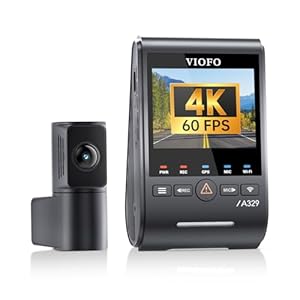
VIOFO A329S 2 Channel 4K Dashcam
-26% Original price was: AED2,159.99.AED1,599.99Current price is: AED1,599.99. -26%- 4K 60fps front + 2K rear on dual STARVIS 2 sensors — Sony IMX678 and IMX675 with HDR on both cameras for readable number plates day and night.
- Supercapacitor, rated −20°C to 65°C — no lithium battery to degrade in a parked car through the UAE summer.
- Energy-saving parking mode — low-power impact detection starts recording on a collision; needs the VIOFO HK4 or HK6 hardwire kit (sold separately).
- Wi-Fi 6 at up to 30 MB/s — a 1-minute 4K clip reaches your phone in under 10 seconds in the VIOFO app.
- External SSD up to 4 TB or microSD up to 512 GB — weeks of recording before footage is overwritten; storage not included.
FAQ
Can I use dashcam footage to dispute a traffic fine in the UAE?
How do I dispute a traffic fine in Dubai?
How long do I have to dispute a fine in Abu Dhabi?
Should I pay the fine before objecting?
Can dashcam GPS prove I was not speeding?
Sources
- Gulf News: Can dashcam footage help you dispute a traffic fine in the UAE?
- Gulf News: How to dispute Dubai traffic fines online
- Gulf News: Appeal traffic fines within a month, Abu Dhabi Police advise
- Bayut: How to contest traffic fines in the UAE
General information, not legal advice. Objection channels and rules change; for a significant fine or a court referral, speak to a UAE-qualified lawyer.